
How to Enter Pre-Factor Expenses in Factor
When you begin using Factor, you may already have outstanding expenses related to your projects — vendor invoices, reimbursable expenses owed by clients, or items that have already been billed or paid. To accurately reflect project profitability and support your pay-when-paid reporting, you may want to enter historical expense information into Factor.
Factor supports three different methods for entering pre-Factor expenses. The best method depends on how much detail you need, whether items still need to be billed or reimbursed, and whether you require phase-level reporting.
Before choosing a method, it’s important to understand the four key values involved in expense tracking.
The Four Important Expense Values
When tracking expenses to projects, there are four values most firms are concerned with, each representing a different stage in the expense’s financial lifecycle:
- Amount Requested from the Vendor: The amount the vendor billed you (the cost).
- Billable Value of the Expense: The amount you could invoice your client—often the vendor cost plus markup.
- Amount Invoiced to the Client: How much of the billable value you actually invoiced.
- Amount Paid to the Vendor: How much you have already reimbursed the vendor for this expense.
Tracking these values accurately supports profitability analysis, billing transparency, and pay-when-paid reporting.
Three Methods for Entering Pre-Factor Expenses
Method 1: Use Prior-to-Factor Values on Phases (Recommended)
This method provides phase-level accuracy without entering individual expenses. It offers the right mix of precision and efficiency for most historical expense imports.
Factor automatically assumes that:
• Amounts you enter as Previous Cost were already paid to the vendor
• Amounts you enter as Amount Invoiced Prior to Factor were already collected from the client
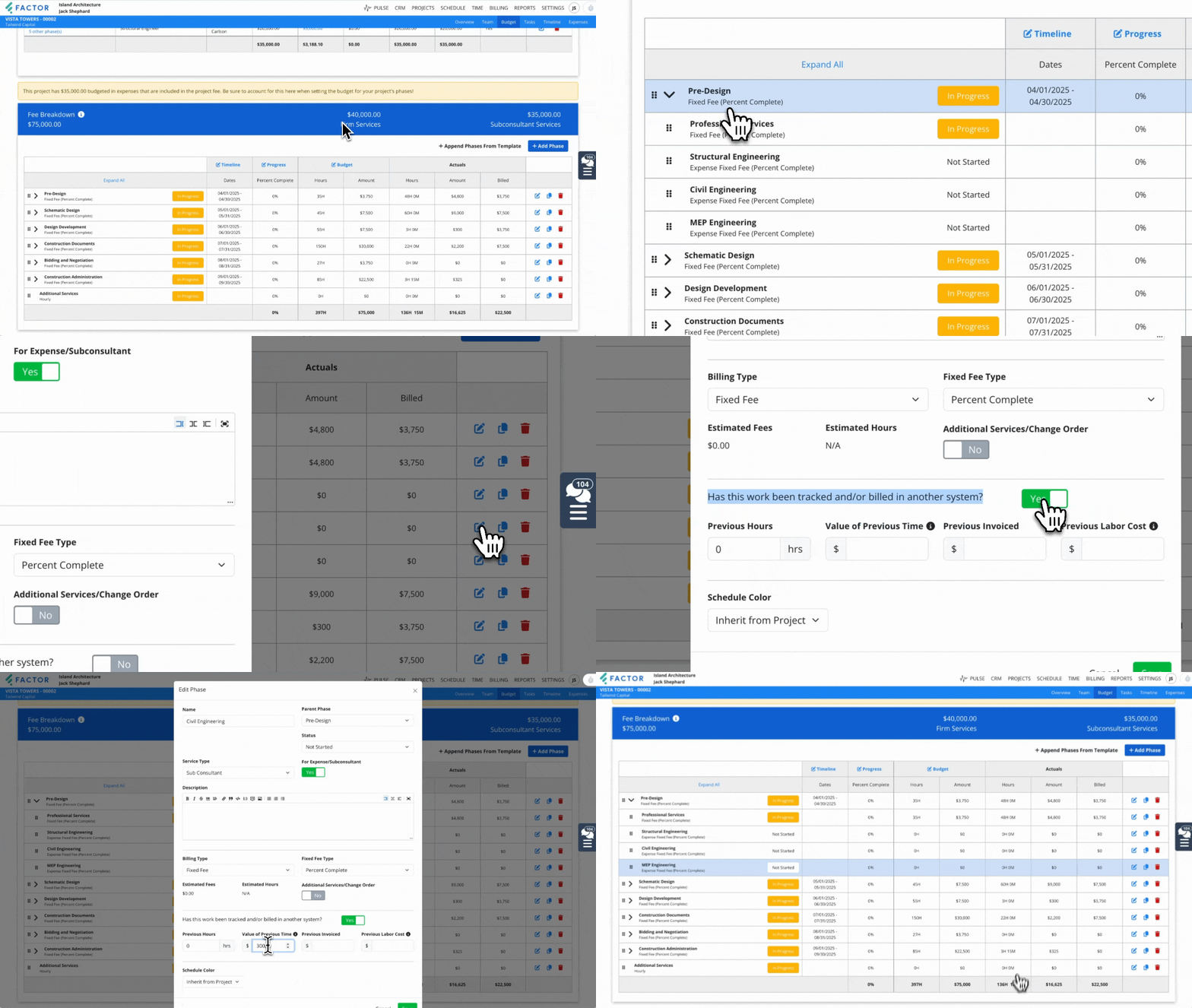
How to Enter Prior-to-Factor Expense Values
- Amount Requested from the Vendor: Enter this in the Previous Cost field.
- Billable Value of the Expense: Enter this in the Value of Time Logged (Prior to Factor) field.
- Amount Invoiced to the Client: Enter this in the Amount Invoiced Prior to Factor field.
- Amount Paid to the Vendor: Factor assumes the Previous Cost has been fully paid.
When Not to Use This Method
Avoid this method when:
• Some expenses remain unpaid to the vendor
• Some expenses remain uninvoiced to the client
• You need item-level pay-when-paid tracking
• Submittal-level detail is required
Method 2: Enter a Single Combined Expense per Vendor (Fastest)
This method is best for quickly capturing all historical expenses for a specific vendor when all grouped items share the same markup and no phase-level detail is required.
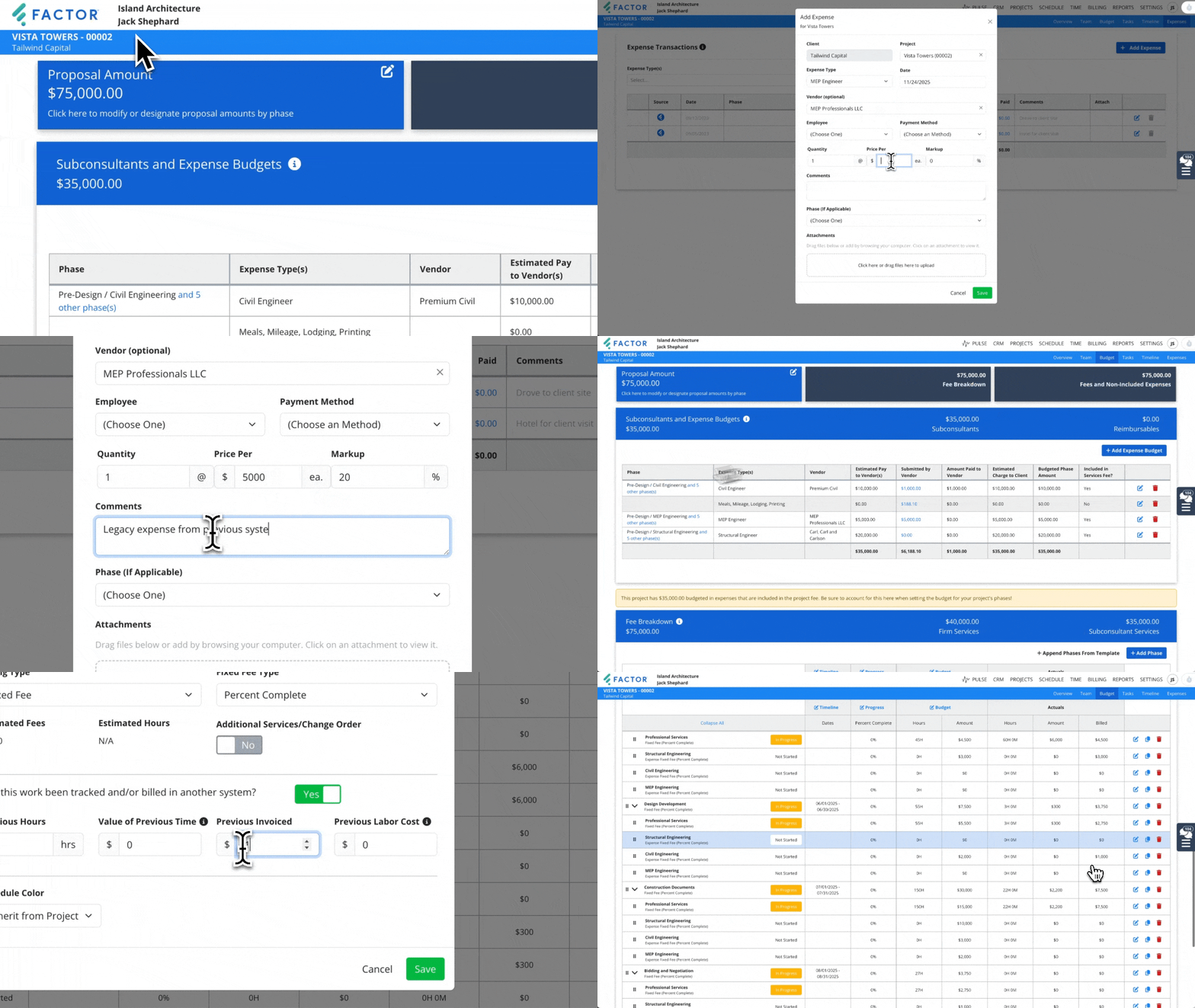
How to Enter a Combined Expense
- Create one expense record: Set the amount requested from the vendor to the total across all pre-Factor expenses.
- Apply markup: Apply markup once to generate the total billable value.
- Enter vendor payment: Enter the total amount paid to the vendor across all grouped items.
- Enter invoiced amounts: Use the phases linked to the expense budget to indicate the total amount invoiced to the client.
Method 3: Enter Each Expense Individually (Most Detailed)
This method allows maximum detail and accuracy, ideal for firms that need a dated history of each individual expense, payment tracking, or still need to invoice some expenses.
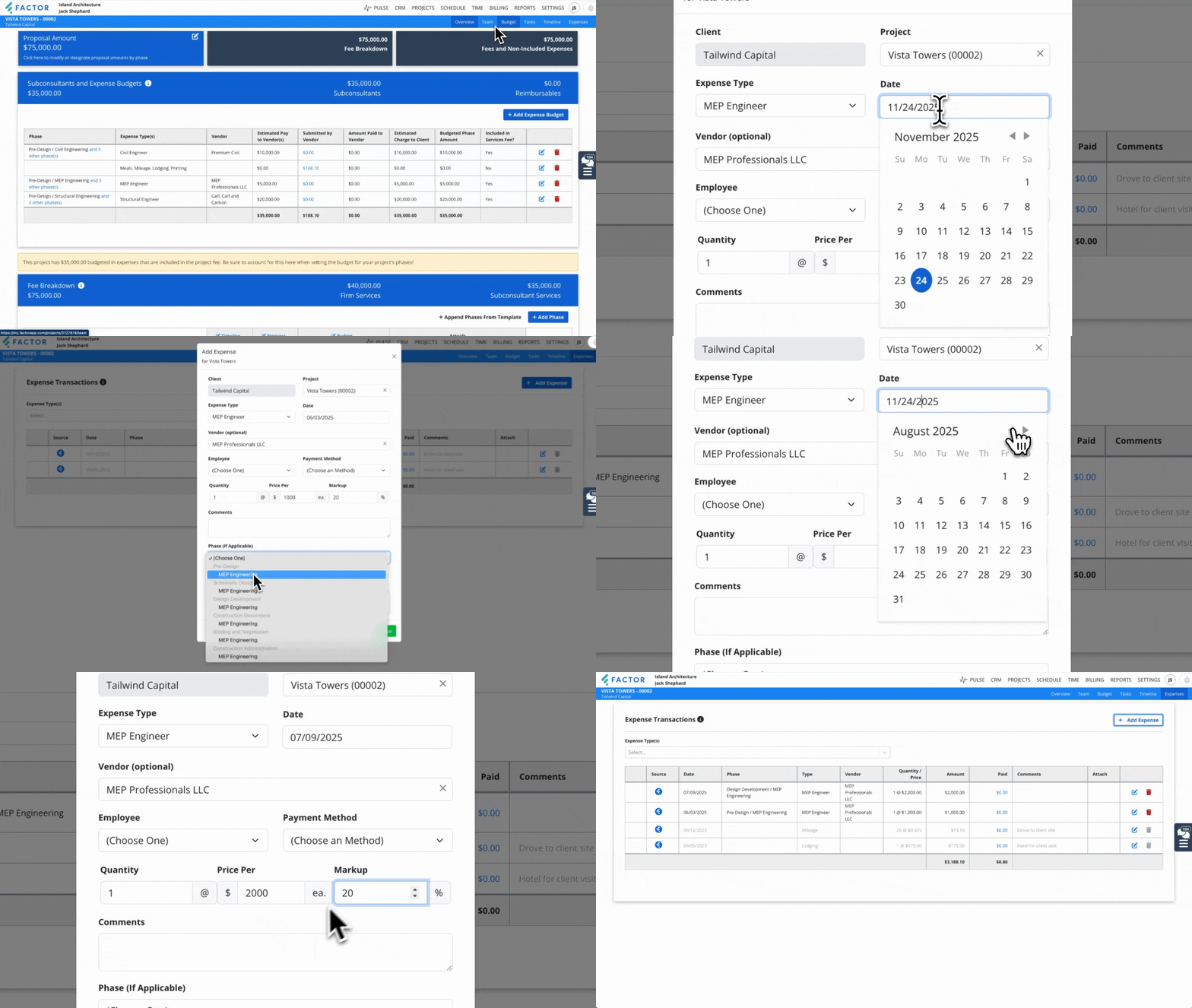
How to Enter Individual Expenses
- Create an expense record: Enter the date requested and amount requested from the vendor.
- Capture the billable value: Apply markup as needed to ensure the billable value matches what would be invoiced or reported.
- Associate the expense to the correct phase: Ensures billable value rolls up correctly to reporting and invoicing.
- Record vendor payment: Enter the amount paid to the vendor.
- Record the amount invoiced to the client: Enter the amount invoiced on the phase using the “Tracked in a Previous System Invoice” field.
Hybrid Method: Combine Phase-Level Values with Individual Expenses
If most expenses are already billed and paid but a few items remain unresolved, you can combine methods:
• Use phase-level prior-to-factor fields for all completed historical expenses.
• Create individual expense records only for items where the vendor has not been paid, the client has not been invoiced, or pay-when-paid tracking is still ongoing.
Summary: Choosing the Right Method
|
Method |
Best For |
Pros |
Cons |
|
1. Prior-to-Factor phase values (Recommended) |
Most typical scenarios |
Accurate phase-level reporting; supports pay-when-paid automatically |
Not ideal when unpaid or unbilled items remain |
|
2. Single combined expense |
Quick vendor-level totals |
Fastest; simple entry |
No phase-level or item-level detail |
|
3. Individual expenses |
Full detail; still-unbilled items; pay-when-paid per item |
Maximum accuracy and traceability |
Time-consuming |
|
Hybrid |
Mixed cases |
Flexible and accurate |
Requires two methods |